Getting Started in Cubes
Learn click / Q / F controls, craft your first weapons, and keep the crystal alive.
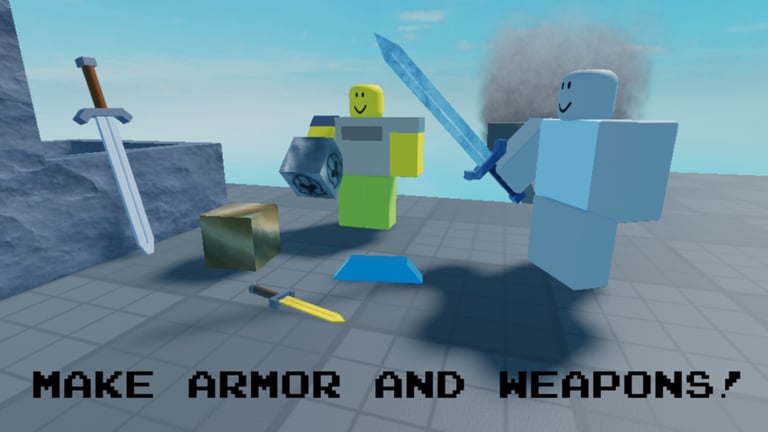
Cubes on Roblox is a cube-combination combat fangame by polygroup’s Cubes, inspired by Cube Combination. You join servers of up to 50 players, combine cubes into weapons and armor, fight bosses, and defend the crystal. This guide is your first-hour checklist: controls, early craft goals, crystal habits, and the exact wiki pages to open next.
Cubes has been in beta / early access since 2022-12-02, with ongoing updates (including a notable checkpoint around April 2026). Expect systems to deepen over time, but the core loop stays stable — so muscle memory on controls and crystal awareness pays off every session. The embedded official trailer mid-page is the tone-setter; deep how-tos for coins, inventory, and repair live on their own sibling guides.
Controls you must learn first
Cubes uses the same family of interactions as Cube Combination:
- Click to pick up cubes and use held items.
- Q drops the cube or item near your mouse, inside a radius around you — aim the cursor where you want the drop, then press Q.
- F swaps what is in your hands so you can rearrange combinations without throwing everything on the ground.
Practice Q drops in a quiet corner before a wave hits. Most failed recipes come from dropping the wrong cube onto the wrong partner or missing the radius. Keep your mouse intentional: the drop is not “at your feet only,” it follows the cursor within range.
When inventory feels messy, swap with F, park spare cubes safely away from the crystal lane, and only carry what you need for the next craft. Clutter near the crystal gets you killed mid-combination. For max slots, staging piles, and backpack rules, open the full Inventory guide once you survive the first wave.
Your first ten minutes
- Spawn and scan — Find where cubes are appearing, where teammates cluster, and where the crystal sits. Cubes is a defense game; orientation beats greed.
- Pick up basics — Grab common cubes and try simple Stick-line crafts. A Stick into Reinforced Stick or Long Stick already improves your ability to clear trash mobs.
- Make a real weapon — Push toward a basic Sword, Dagger, Greatsword, or Spear as soon as materials allow. Do not obsess over Gold/Cobalt/Adurite on minute five.
- Glance at armor — Even light protection changes how long you can stand near the crystal. Open the full Armor guide after your first death teaches the lesson.
- Return to the crystal — If nobody is holding the point, you are the holder. Crafting at the edge of the map while the crystal dies is how early runs fail.
Redeem anything useful from Codes before a long grind so free rewards accelerate the first kit (none confirmed active as of November 2026—still worth checking after patches). Then compare early choices on the Tier List once you understand what you can actually craft.
First combinations that matter
Early Cubes progression is a ladder, not a lottery:
- Stick family — Stick → Reinforced Stick / Long Stick. These teach drop timing and give you a safer poke tool.
- Core melee trees — Sword, Dagger, Greatsword, and Spear lines. Each can climb through Gold, Cobalt, and Adurite tiers later.
- Elemental peek — Flame Sword, Blue Flame Sword, and Ice Sword are mid goals, not day-one mandates.
- Specialist goals — Halberd, Energy Sword, and endgame pieces like Midnight Sword (lifesteal) or boss drops such as Ice Lance belong after you can survive.
For the complete tree, recipes mindset, and upgrade order, read Weapons. For plate and survival layering, read Armor. This page only needs you to craft something reliable and stop dying with empty hands.
Defend the crystal like it is the win condition
Because it is. Cubes asks you to fight bosses and defend the crystal; fancy gear is a means, not the scoreboard. Build these habits early:
- Never leave the crystal alone during active pressure. Call for a teammate or park a safer kit on point.
- Craft in short bursts — farm cubes, combine, return. Marathon crafting away from the lane invites wipes.
- Use Guardians when ready — the Guardian Cube guide explains how guardian play reduces how often humans must body-block.
- Learn real defense tactics — roles, rotate rules, and boss-night protocol live on Crystal Defense.
- Repair and recover — practice Repair loops before bosses; dying mid-repair with all cubes on the floor is a classic beginner wipe.
When the server is coordinated, one player can specialize in combinations while others hold space. When the server is random, assume you are both crafter and defender until someone proves otherwise.
Coins, inventory, and not wasting progress
Early economy mistakes slow everything. Community coin routes include Forge + Gold and Plate + Gold = 10 coins. Treat Cubes money as a session / session economy: convert and spend for the current run’s needs rather than assuming a permanent MMO wallet. Deep recipes, spending order, and pitfalls are on Coins (with its own dedicated video).
Keep inventory space for combination partners and avoid hoarding cubes you cannot use yet — see Inventory. If you fill your bag with dead-end pieces, drop a staging pile in a safe zone, label it mentally (“stick line,” “armor mats,” “boss bait”), and only carry the next recipe. Cubes punishes backpack tourism.
Mid-session upgrade path
Once you have a basic weapon and some armor:
- Push one melee tree through Gold → Cobalt → Adurite instead of owning four unfinished sticks.
- Add an elemental sword when the cubes appear naturally — do not derail crystal defense for a single Flame craft.
- Assemble a coherent Battle Kit with your squad so everyone is not improvising different endgames.
- Schedule a Bosses attempt (including Izuki-focused fights) when the crystal is stable and at least two players can commit DPS.
- Between sieges, run Repair and restock via Coins only when home coverage exists.
Re-check the Tier List after each successful boss. Drops like Ice Lance can rewrite what “best weapon” means for your lobby.
Common beginner mistakes
- Ignoring Q aim — dropping at your feet when the partner cube is three studs left.
- Never swapping with F — forcing awkward drops instead of rearranging hands.
- Solo edge farming during a siege — returning to a dead crystal and a lost run.
- Chasing Midnight Sword on hour one — skip endgame lifesteal until armor and a mid kit exist.
- Skipping codes checks — free value from Codes is part of efficient starts when promos are live.
- No plan for bosses — read Bosses before the first serious attempt.
- Full inventory forever — fix habits on Inventory before the next bricked recipe.
What to read next
- Weapons — full Stick-to-endgame weapon guide
- Armor — defensive recipes and equipping notes
- Coins — Forge/Gold and Plate/Gold coin routes
- Inventory — max slots and staging piles
- Repair — gear and defense recovery loops
- Crystal Defense — roles, guardians, rotate rules
- Battle Kit — OP coordinated loadout
- Guardian Cube — crystal support unit play
- Bosses — Izuki and boss fight flow
- Codes — promo status
- Tier List — what to prioritize
- Guides Hub — full tutorial index
Join Cubes, lock in click / Q / F, craft a real weapon, and treat the crystal as the objective. Everything else on this wiki exists to make that loop cleaner.
Frequently Asked Questions
Quick answers to the most common questions.
What are the Cubes controls on PC?
Click to pick up and use items, Q to drop a cube near your mouse within a radius, and F to swap hands — the same control family as Cube Combination.
What should I craft first in Cubes?
Start with the Stick line into a basic Sword, Dagger, Greatsword, or Spear, then add light armor. Save Gold/Cobalt/Adurite and elemental swords for after you can hold the crystal.
Why does the crystal matter so much?
Cubes is built around fighting bosses and defending the crystal. Gear only matters if the crystal survives; leave the point empty and the run collapses. See Crystal Defense for roles and rotate rules.
Is Cubes still in beta?
Yes. Cubes has been in beta / early access since 2022-12-02 on Roblox and continues to update, so expect balance and recipe polish over time.
Where do I go after this beginner guide?
Open Weapons and Armor next, then Coins, Inventory, Repair, and Crystal Defense. Redeem Codes when live, check the Tier List, and specialize into Battle Kit, Guardian Cube, and Bosses.
How many players are on a Cubes server?
Server size is 50. Play assumes online multiplayer coordination around crafting and crystal defense.
How do early coins work?
Community routes include Forge + Gold and Plate + Gold for 10 coins. Treat spending as session-focused and read the Coins guide for full detail.